
European workers (ie. from the EU, EEA, and Switzerland) that have been living in the UK before 1st of January 2021 must apply to EU Settlement Scheme in order to continue working and living in the UK. To view their status (settled or pre-settled), they would need to provide you with a Share Code ID that you can then use on the GOV.UK website.
Please note, this feature is a requirement and cannot be turned off. Every qualifying worker, whose Share Code ID is not be added and verified, will be marked as 'Not OK to pay' on 1st of July 2021.
How to add Share Code ID?
Step 1. Log in to Engage portal
Step 2. Navigate to the 'Network' section and click on 'Workers'
Step 3. Find a worker in question
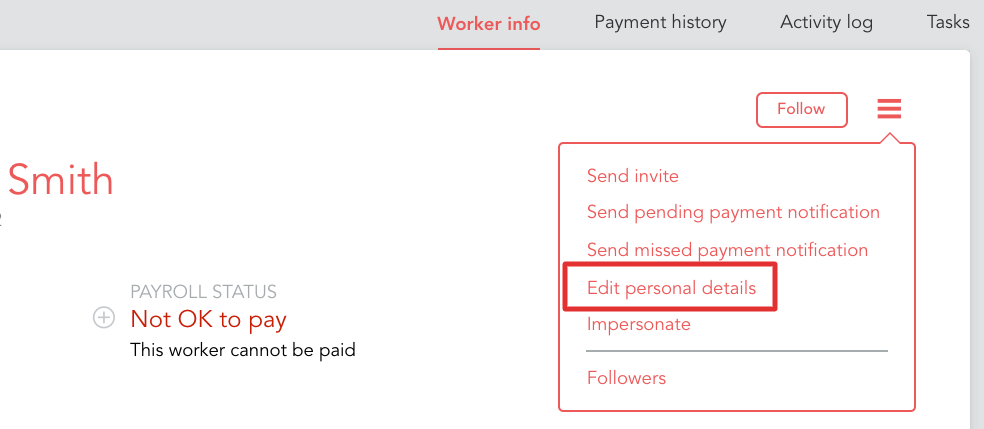
Step 4. Click on 'Edit personal details' from the 3-line menu
Step 5. Scroll down to 'Share Code ID' and enter it.
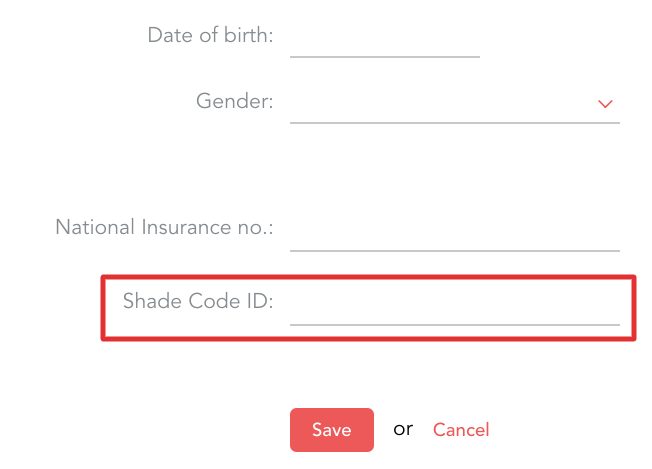
Please note, following the above steps will only allow you to add the code - verification will need to be done at a later stage.
How to verify a worker's status?
Step 1. Log in to Engage portal
Step 2. Navigate to the 'Network' section and click on 'Workers'
Step 3. Find a worker in question
Step 4. If your worker provided before you will see it in the Share Code ID section, in this case just copy Share Code ID from the profile
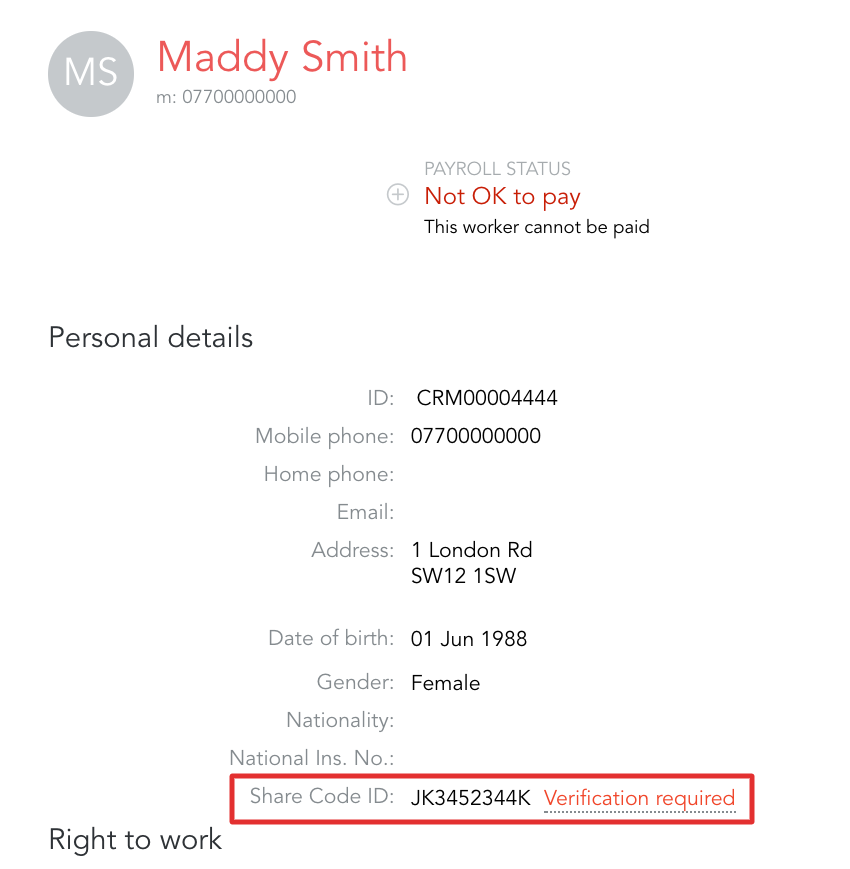
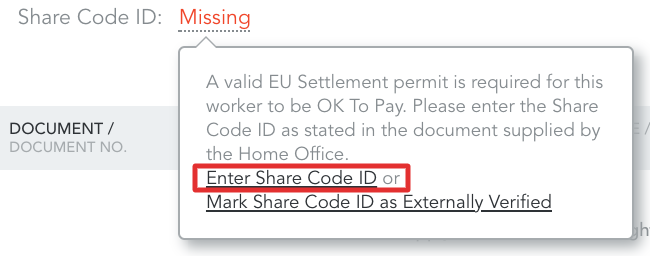
If it shows up as 'Missing', you can add the code on behalf of you worker by entering it on the profile page or going to 'Edit personal details' from 3-line menu in the top right corner
Step 5. Follow the steps on the GOV.UK website
Step 5.1.1. If the code is valid you will get a PDF file with the worker's details
Step 5.1.2. Locate your workers' profile on Engage
Step 5.1.3. Click on 'Verification required' by the Share code ID
Step 5.1.4. Upload the file you got from the GOV.UK and set an expiry date:
Settled status gives worker a permanent right to work and live in the UK - feel free to put any date in the future to make sure this document doesn't expire
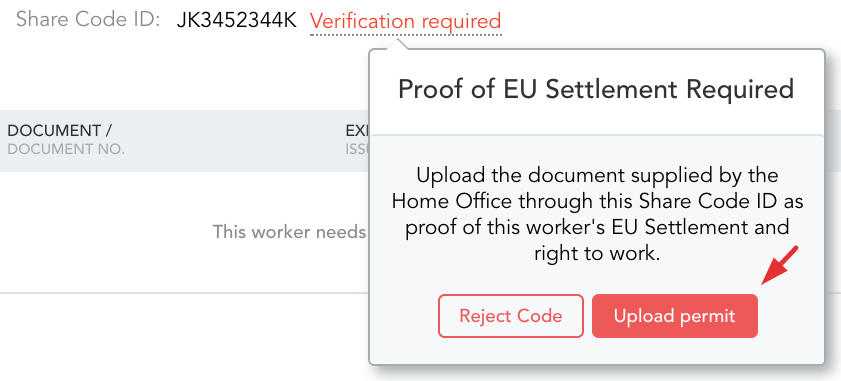
Step 5.1.5. If this was the only missing document for the worker, they will now be 'OK to Pay'
If the code is invalid, please reject it and ask your worker to double-check if they've made a mistake writing it down.
Important!
At the moment, workers will not be notified if you reject the code so please remember to make contact with them.
Workers from overseas
Currently there is no process to identify overseas workers on Engage therefore if they have an EU, EEA or Swiss passport - they will be marked as 'Not OK to Pay'. To avoid this we have introduced a temporary solution to allow contractors to stay 'OK to Pay'.
Step 1. Log in to Engage portal
Step 2. Navigate to the 'Network' section and click on 'Workers'
Step 3. Find a worker in question
Step 4. From the 'Missing' button click on 'Mark Share Code ID as Externally Verified'
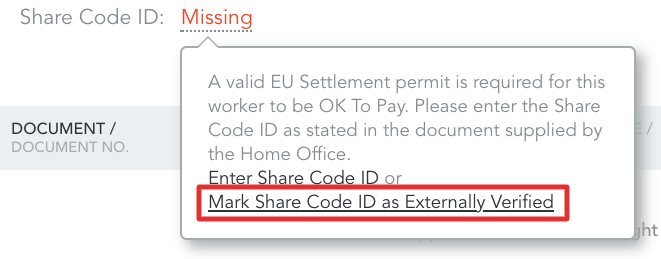
Step 5. Your worker will now be 'OK to Pay', if this was the only task they were missing
Verifying documents externally
If you are managing your compliance outside Engage or decide not to collect this information at the moment, you can avoid workers being 'Not OK to Pay' by marking their Share Code ID as externally verified. To do this please follow the same steps as in the section above (Workers from overseas).
Very important!
Please note, this is a temporary solution. As per the Government's guidelines, employers continue to be responsible for ensuring that employees have provided the correct RTW documentation.
From the 1st July, this means that all new qualifying employees will need to provide a Share Code ID and employers will need to collect the linked settled or pre-settled status documentation.
Current guidance states that for employees working prior to 1st July the employer does not need to collect the employees' settled or pre-settled status documentation. The guidance, however, does not exempt an employer from their responsibility of having the correct documentation in place ad infinitum for these employees and it is strongly advised that as an employer you continue to ensure you have all relevant right to work documentation in place for each employee.
The above functionality is the first version; we are already working on improvements - these are planned to be released in Q3. At the point of release, every worker whose code is marked as 'Externally verified' (apart from international workers) will be re-marked as 'Not OK to Pay' so as to ensure that all employers using the system can make sure they have the correct documentation in place.