
Who can register workers?
Anyone can add overtime rates to placements (you can find out more about roles and privileges here)
Step 1. Login to your Engage platform
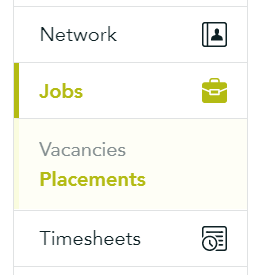
Step 2. Navigate to the 'Placement' from the 'Jobs' section
Step 3. Find the placement and click on it
Step 4. Click the menu button and select 'Edit Placement'
Step 5. In the Rate section add the overtime rate as a 'piece' rate type (pay type will be PAYE or contract depending on the placement)
Step 6. 'Save' the placement

Step 2. Navigate to the 'Placement' from the 'Jobs' section
Step 3. Find the placement and click on it
Step 4. Click the menu button and select 'Edit Placement'
Step 5. In the Rate section add the overtime rate as a 'piece' rate type (pay type will be PAYE or contract depending on the placement)
Step 6. 'Save' the placement
Piece rates are shown in the Fixed rate section of the timesheets: